All projects

1OverviewTP-SDE-2026 · Shipping Agent

TP-SDE-2026PJ-03

Shipping Agent

Paste an order, get a label: an AI shipping desk that quotes every carrier through ShipStation and checks out to a printable label.

  • Python
  • Streamlit
  • ShipStation API
  • Groq
  • AWS Bedrock
  • pytest

2In the productTP-SDE-2026 · Shipping Agent

Paste an order, get a label. A 24-second demo: an order is pasted into the assistant, ShipStation returns 14 rates, Choose cheapest opens checkout, and a USPS Media Mail label prints. The order, rates and tracking number come from a real run against the ShipStation sandbox with Groq.
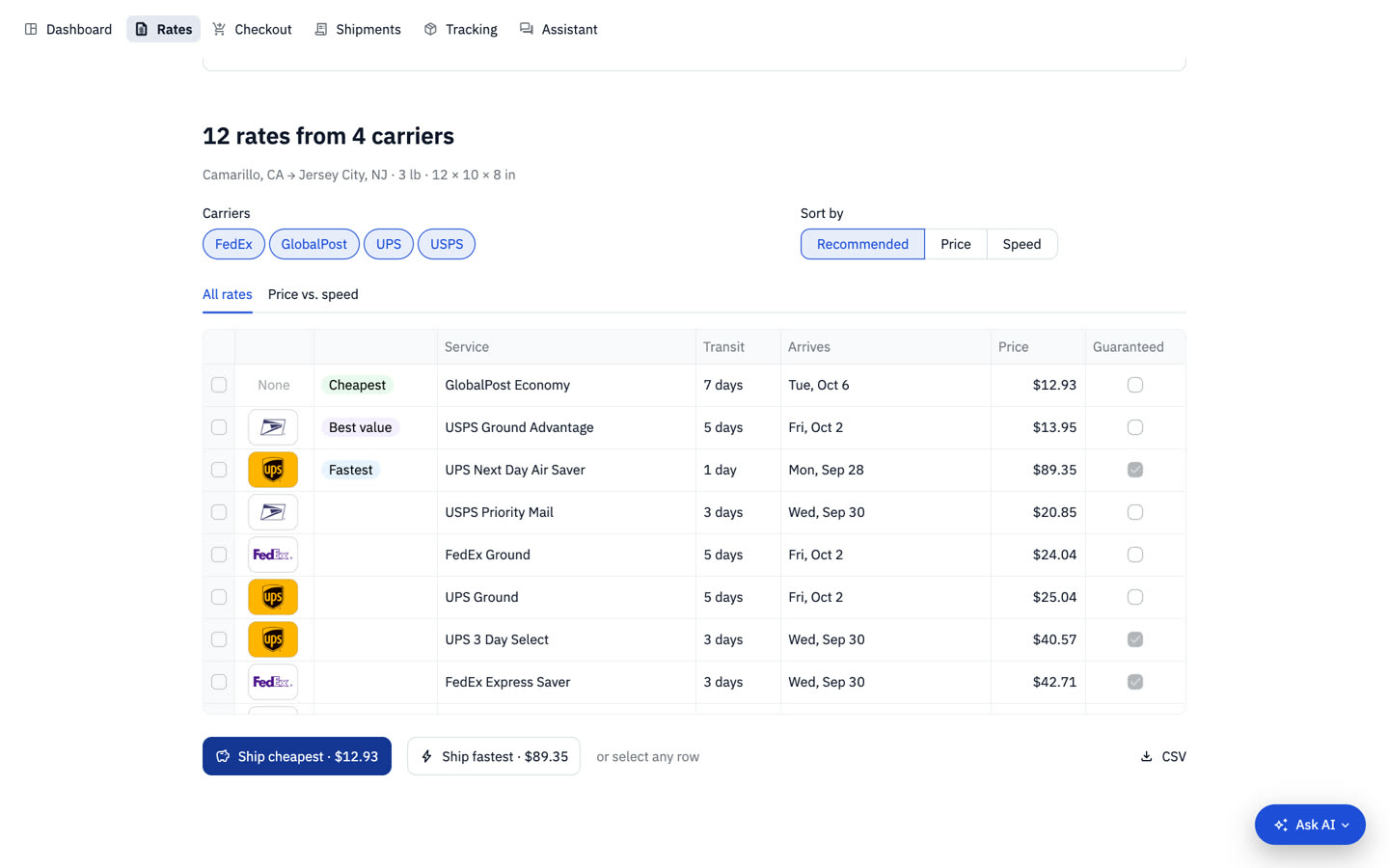
Rates: 12 rates from 4 carriers side by side, with carrier logos and Cheapest, Best value and Fastest picks, then Ship cheapest or Ship fastest in one click.
Rates. 12 rates from 4 carriers side by side, with carrier logos and Cheapest, Best value and Fastest picks, then Ship cheapest or Ship fastest in one click.
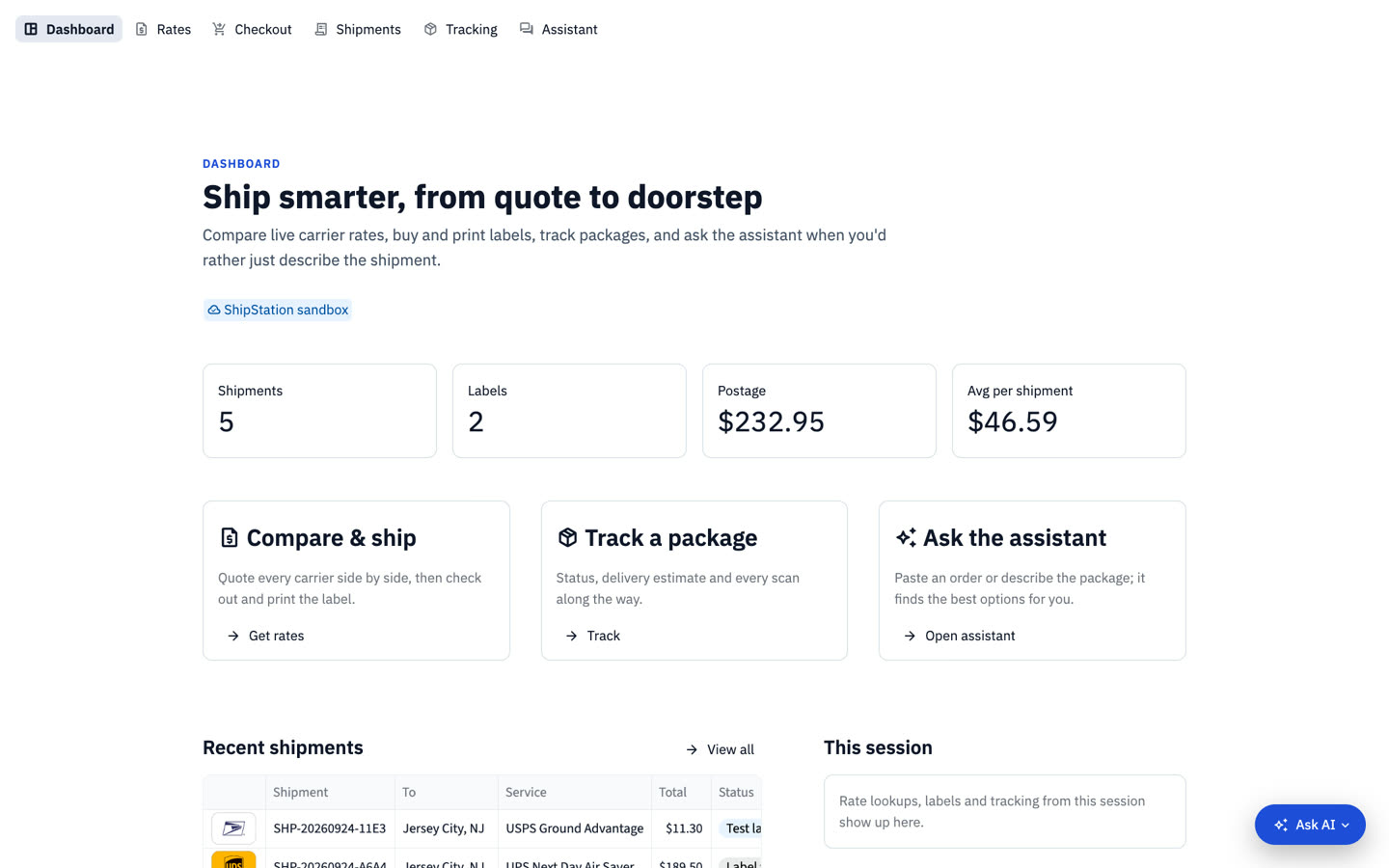
Dashboard: Shipments, labels and postage at a glance, with shortcuts to compare and ship, track a package or ask the assistant.
Dashboard. Shipments, labels and postage at a glance, with shortcuts to compare and ship, track a package or ask the assistant.
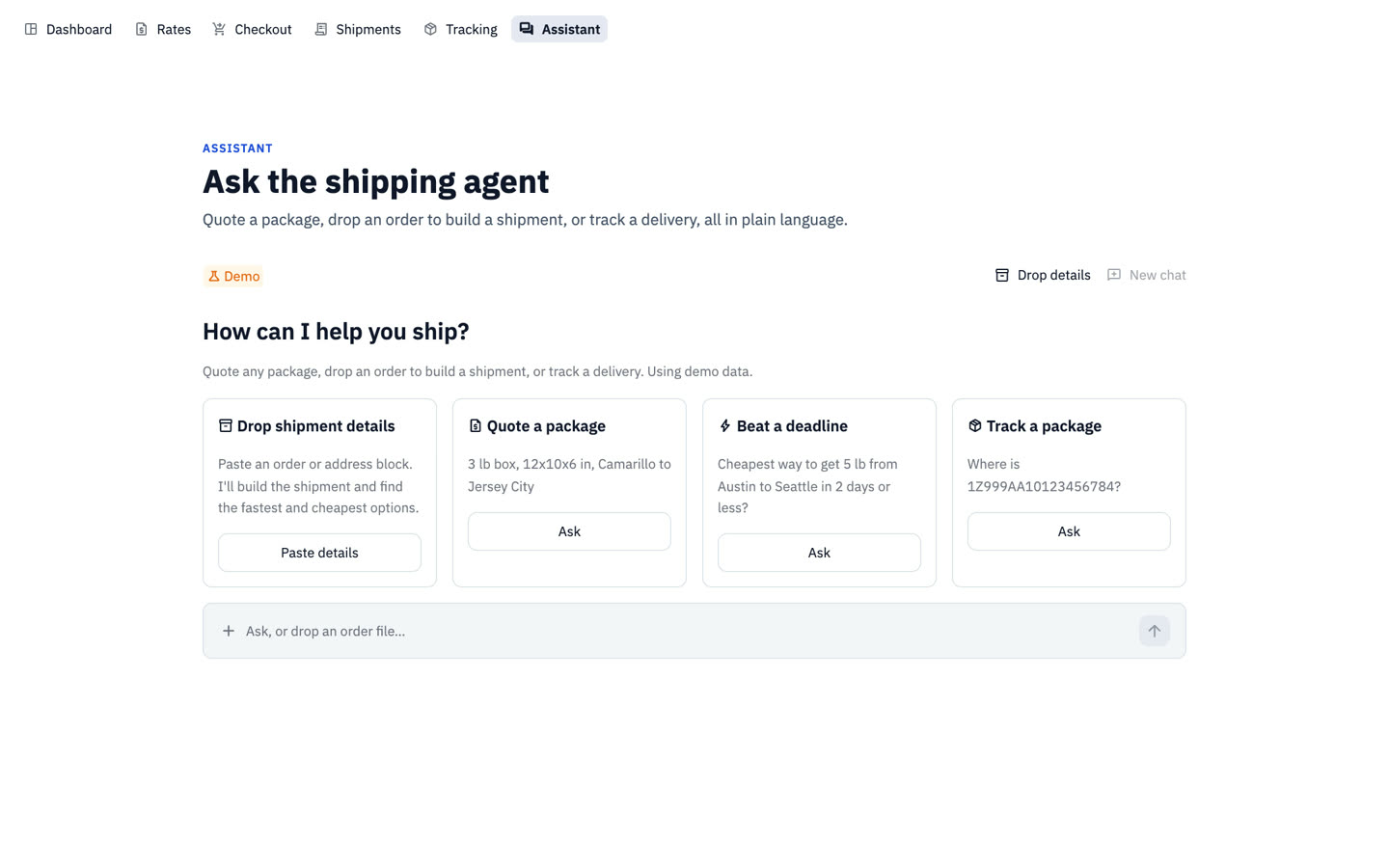
Assistant: Paste an order to build a shipment, quote a package or track a delivery, all in plain language.
Assistant. Paste an order to build a shipment, quote a package or track a delivery, all in plain language.
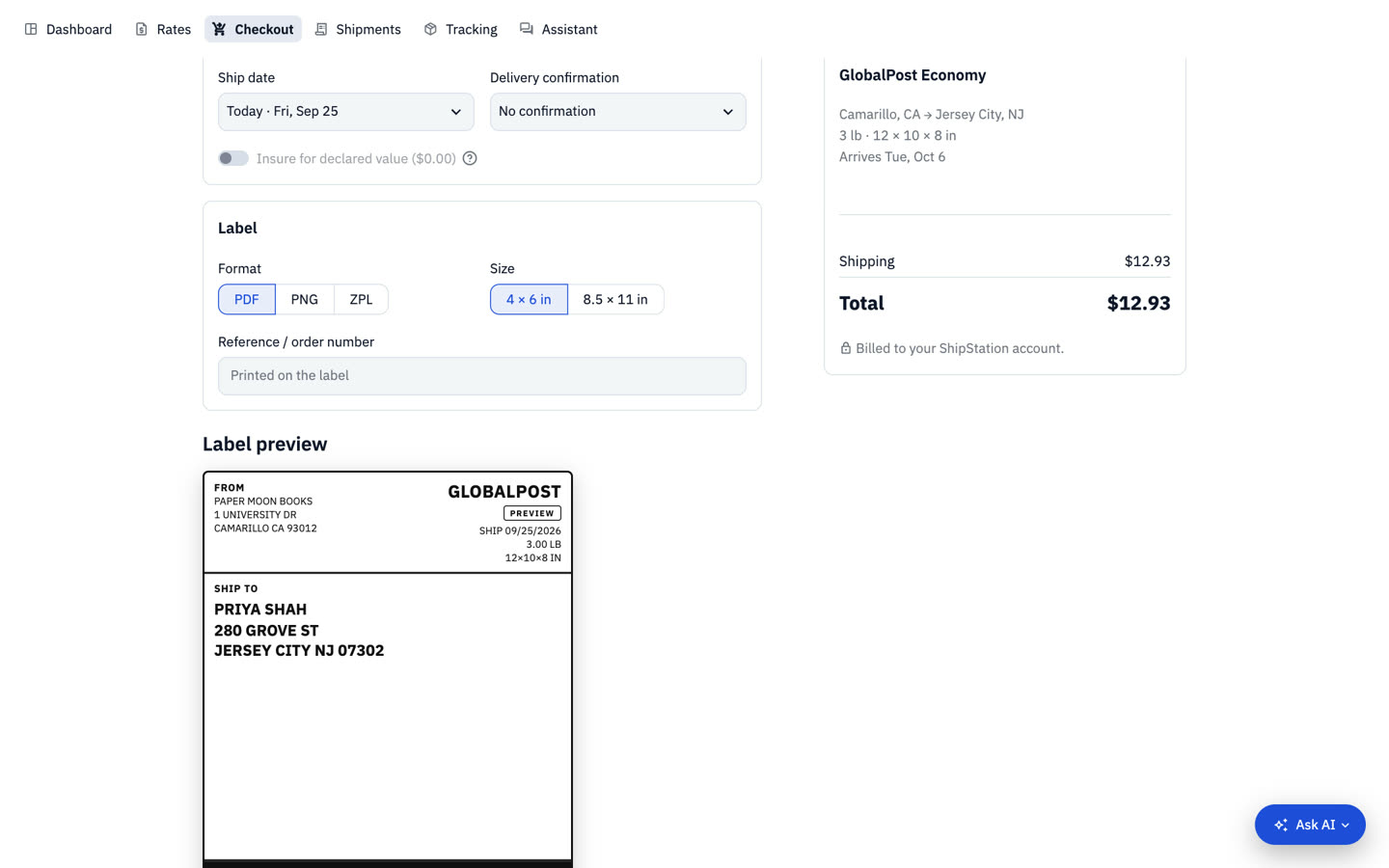
Checkout: label and options: Ship date, delivery confirmation, insurance and label format (PDF, PNG or ZPL), with a live preview of the label.
Checkout: label and options. Ship date, delivery confirmation, insurance and label format (PDF, PNG or ZPL), with a live preview of the label.
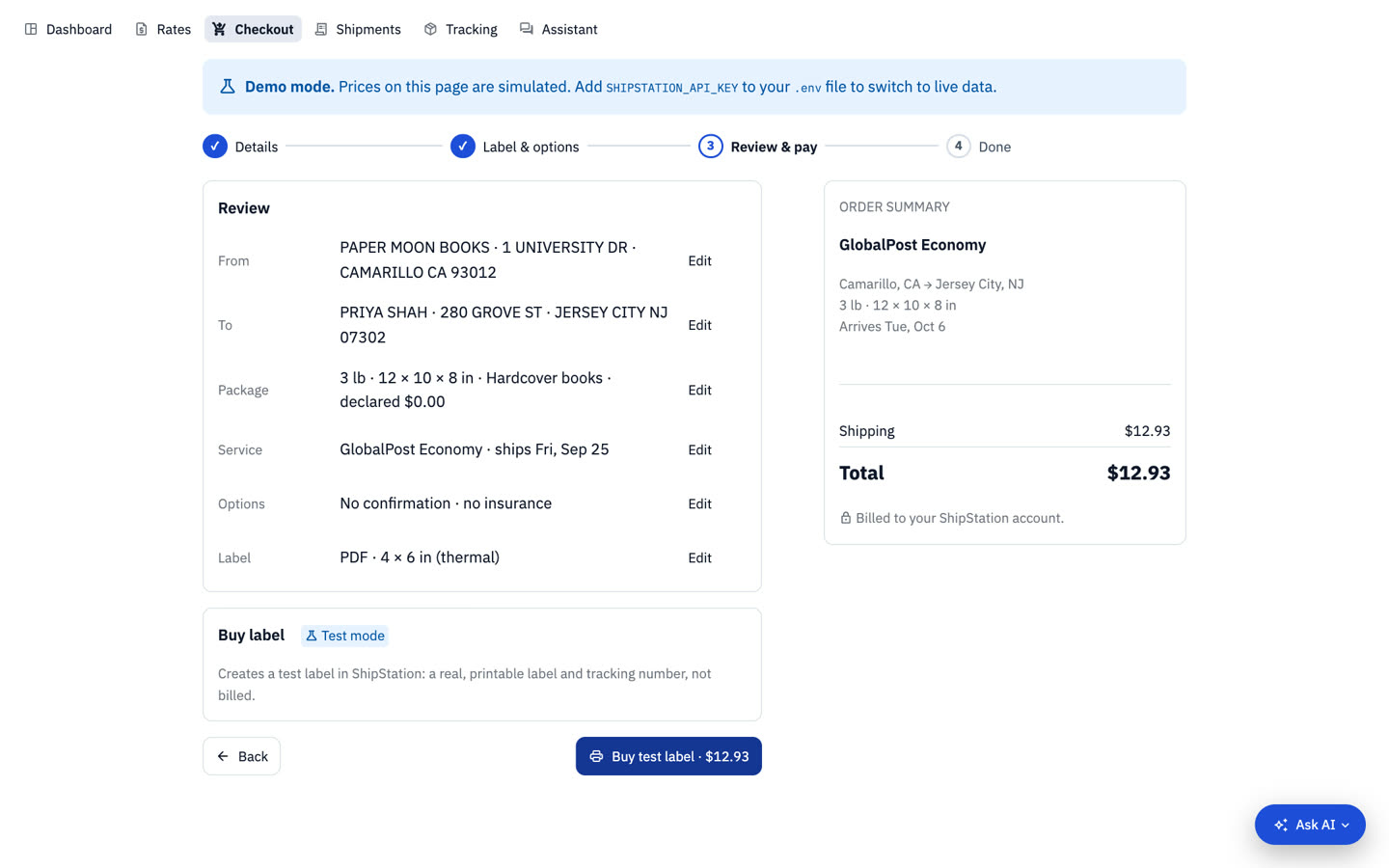
Checkout: review and pay: Every detail on one screen with Edit links, then a test label in sandbox mode or payment in ShipStation.
Checkout: review and pay. Every detail on one screen with Edit links, then a test label in sandbox mode or payment in ShipStation.
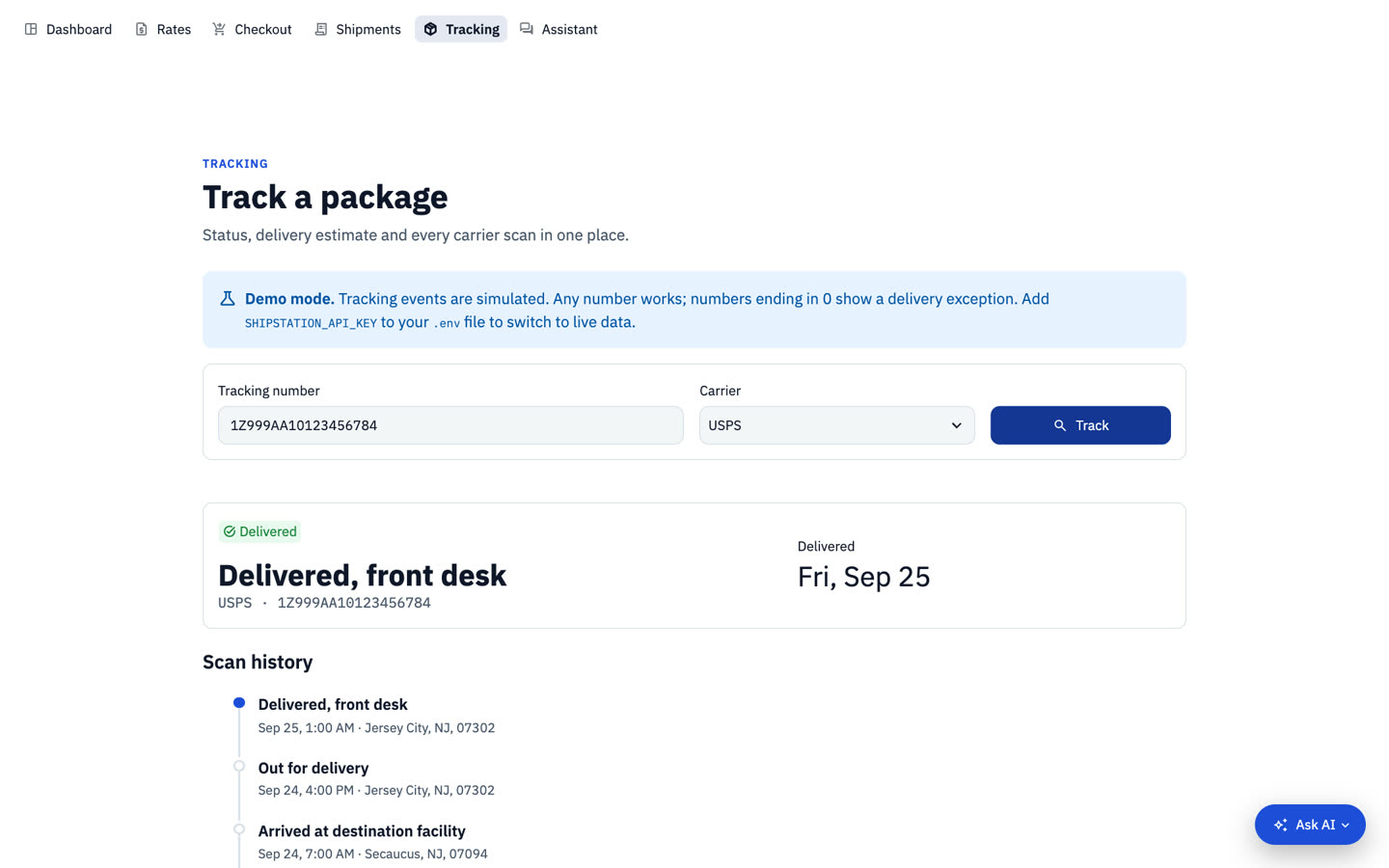
Tracking: Status, delivery date and every carrier scan in one place.
Tracking. Status, delivery date and every carrier scan in one place.

Screenshots of the app running in demo mode, with simulated rates and fictional addresses.

3Problem → solutionTP-SDE-2026 · Shipping Agent

The problem

Shipping one package usually means five tabs of copy-paste: lift the address out of an order email, key it into a carrier portal, compare prices across carriers, then buy and print the label somewhere else.

What I built

The whole desk collapses into one paste. The assistant extracts the sender, recipient, package and contents, quotes every carrier at once, and hands off to a checkout that is already filled in, so the path from order to printable label is a couple of clicks.

A Python + Streamlit shipping desk that started as a four-person team prototype and was rebuilt end to end. An AI assistant (Groq tool calling, with an optional AWS Bedrock Agent) reads a pasted order email, packing slip or address block, builds the shipment, and fetches exact rates from every connected carrier through the ShipStation API v2. Rates come back with carrier logos and Cheapest / Best value / Fastest picks; checkout opens pre-filled and ends in a real label PDF with a tracking number. Around the assistant sit Dashboard, Rates, Checkout, Shipments and Tracking pages.

4Where it started: Shipping Agent Assistant (AWS Bedrock)TP-SDE-2026 · Shipping Agent

The project started as Shipping Agent Assistant, a four-person team prototype. It was a single-page Streamlit chat app wired straight to a deployed AWS Bedrock Agent through boto3. The agent called the ShipStation API for rates and tracking, and answered in the chat as prose. Its source still lives in the original repo, and the rebuild keeps that Bedrock Agent as an optional assistant provider.

What it did

  1. ›Chat with a deployed AWS Bedrock Agent through boto3, with IAM-scoped invocation and session IDs.
  2. ›The Bedrock Agent called the ShipStation API itself to fetch shipping rates and tracking.
  3. ›A sidebar form for the AWS region, agent ID and alias ID. Credentials loaded only from environment variables, never hard-coded.
  4. ›Quick-action buttons for Get Shipping Rates, Track Package and Clear Chat.
  5. ›Rates and tracking came back as chat text, so they could not be compared, picked or turned into a label.

What changed

  1. ›ShipStation results became structured data instead of chat text: a rate table you can sort and pick from, plus labels, void and tracking through the ShipStation API v2.
  2. ›The Bedrock Agent is no longer the core. A Groq tool-calling agent builds shipments from a pasted order, and Bedrock stays switchable with CHAT_PROVIDER=bedrock.
  3. ›One chat page grew into a full desk: Dashboard, Rates, Checkout, Shipments, Tracking and the Assistant.
  4. ›Added what the prototype never had: a checkout that ends in a printable label, label-safety rules, a keyless demo mode and 54 tests.
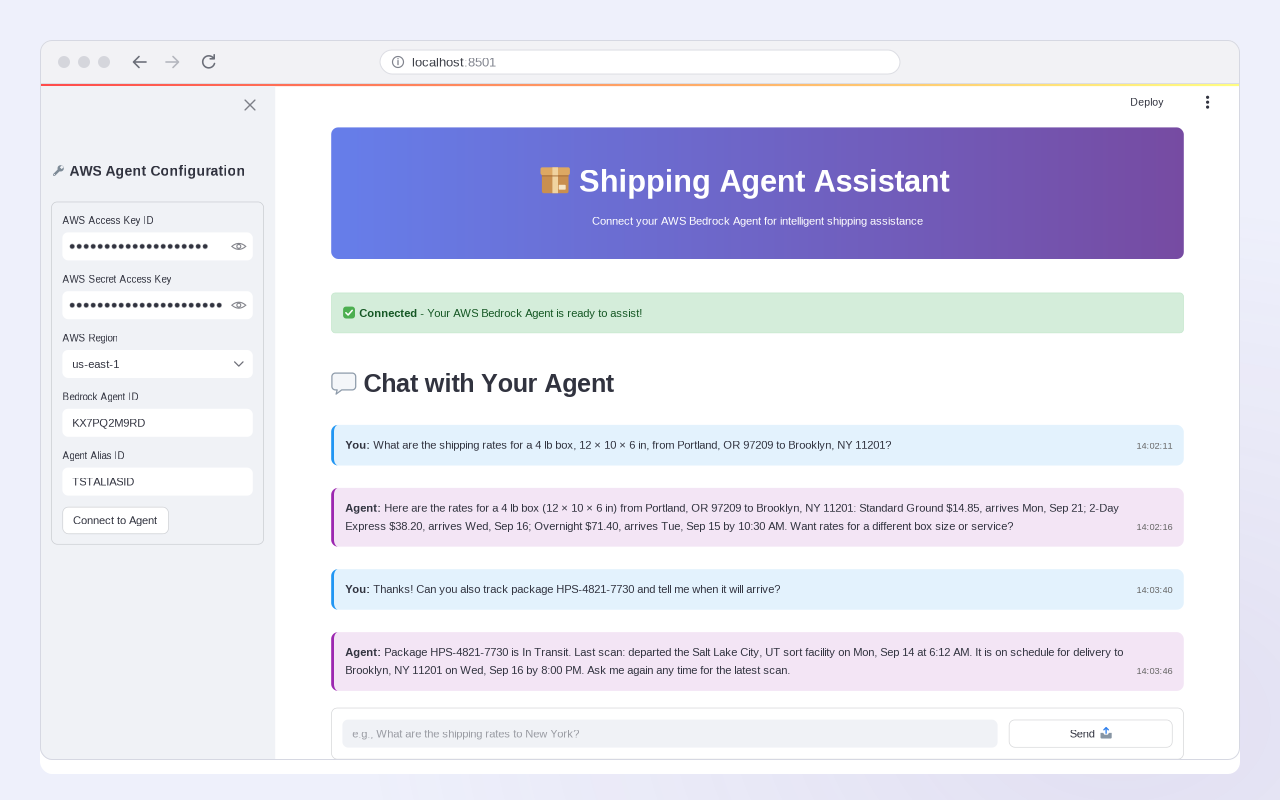
Chat with the Bedrock agent: The agent quotes three shipping rates and tracks a package, with the AWS Agent Configuration form in the sidebar.
Chat with the Bedrock agent. The agent quotes three shipping rates and tracks a package, with the AWS Agent Configuration form in the sidebar.
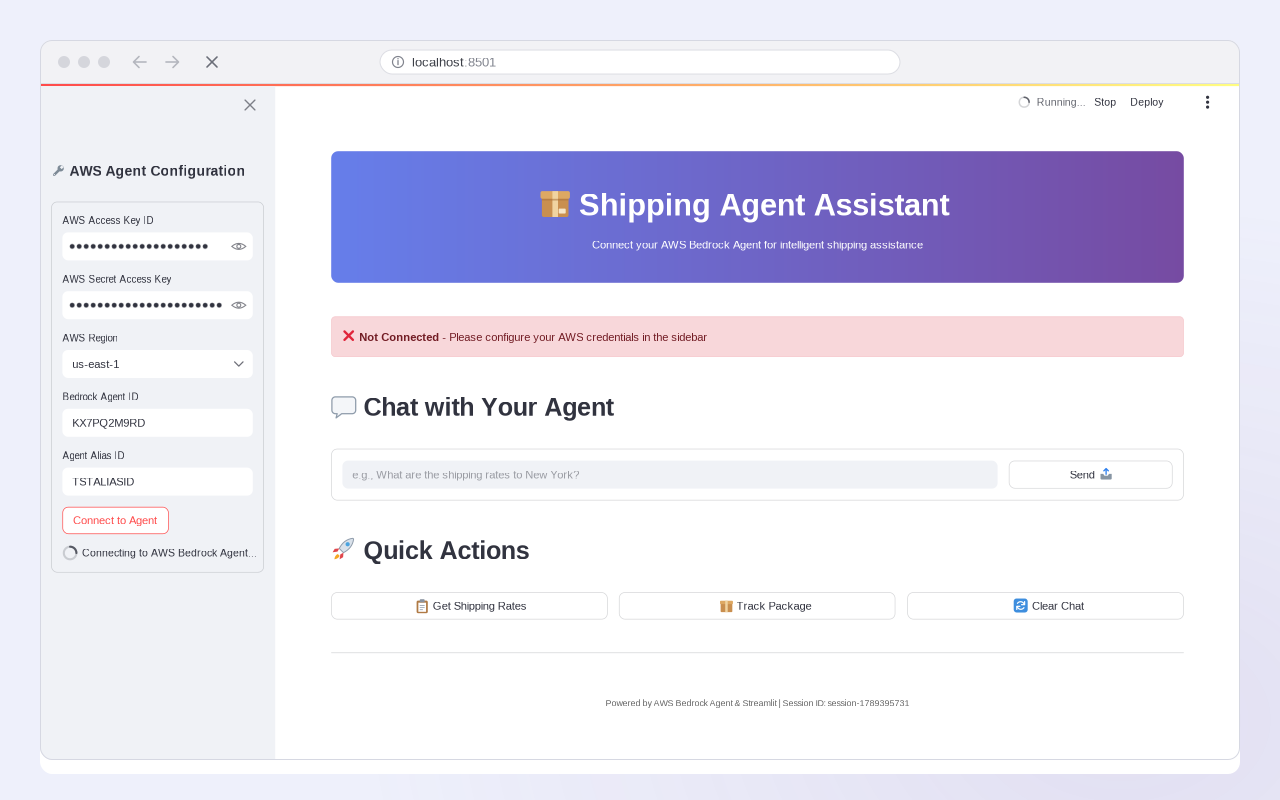
Connecting to the agent: The sidebar form shows the Connecting to AWS Bedrock Agent spinner while the main area still reads Not Connected.
Connecting to the agent. The sidebar form shows the Connecting to AWS Bedrock Agent spinner while the main area still reads Not Connected.
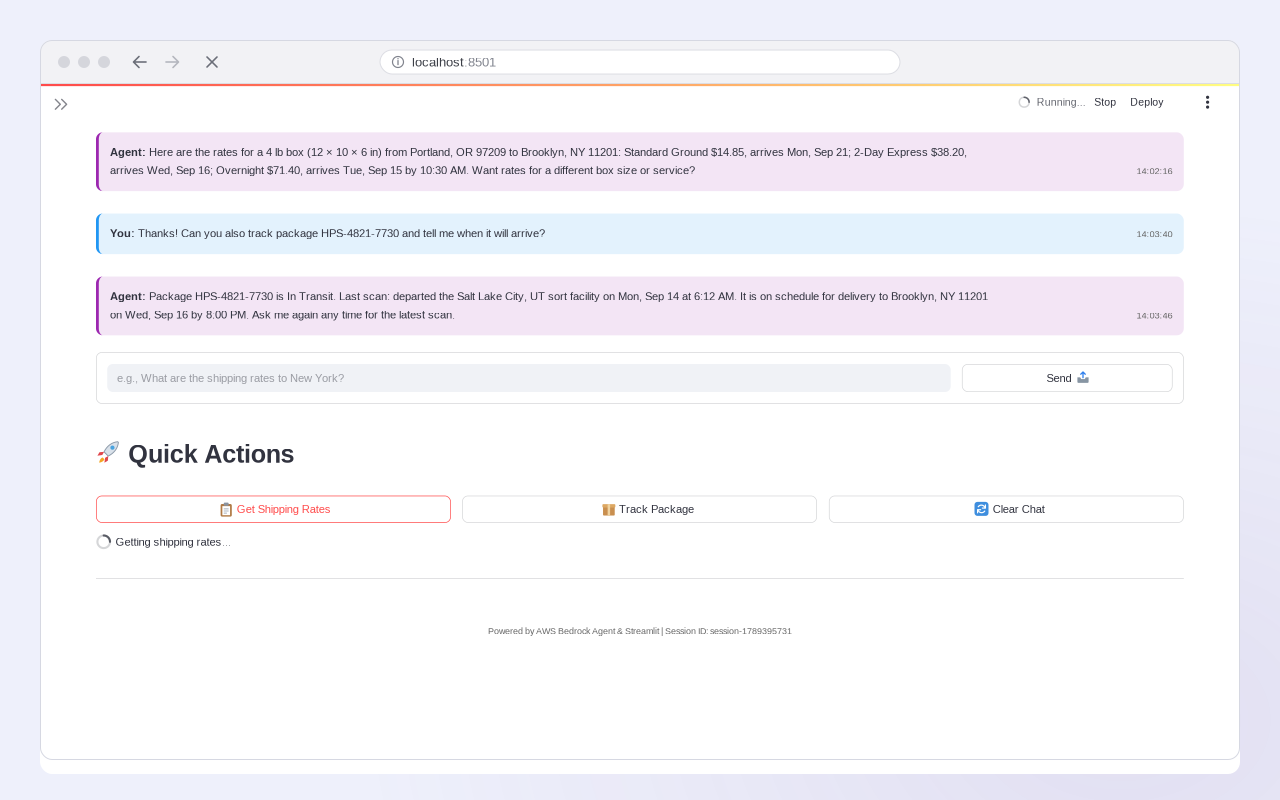
Quick actions: Get Shipping Rates, Track Package and Clear Chat, with the Getting shipping rates spinner and the session ID footer.
Quick actions. Get Shipping Rates, Track Package and Clear Chat, with the Getting shipping rates spinner and the session ID footer.
Legacy source

5How it fits togetherTP-SDE-2026 · Shipping Agent

A multi-page Streamlit app (Dashboard, Rates, Checkout, Shipments, Tracking, Assistant) sits on a small shipping_agent package. A ShipStation API v2 client handles rates, estimates, labels, void, tracking and address validation; a Groq tool-calling agent (or an optional AWS Bedrock Agent) calls quote_rates, create_shipment, track_package, validate_address and list_carriers, and hands a finished shipment to a pre-filled checkout. With no keys, a demo client stands in so every page still works.

Loading diagram…
Fig. 5 · System architecture

How it’s used

  1. 01Paste an order into the assistant, or drop a .txt or .csv file.
  2. 02Groq pulls out the addresses, package and contents, then calls ShipStation for exact rates from every connected carrier.
  3. 03Pick a rate from the table, or use Choose cheapest / Choose fastest.
  4. 04Checkout opens pre-filled; add signature confirmation or insurance and the price updates with the carrier's itemized charges.
  5. 05Buy the label to get a label PDF and tracking number you can print, download (PDF, PNG or ZPL) or void.

6What got hardTP-SDE-2026 · Shipping Agent

C1

An AI that must not make up prices

Problem. A chat model will happily invent a rate or say a label was bought when it was not.

Fix. Every price comes from a ShipStation tool call, the prompt forbids inventing prices or claiming a purchase, and the rate table and label panel render straight from API results.

C2

Buying labels safely

Problem. A production key can buy real, billed labels, which is dangerous in a demo or a misconfigured deploy.

Fix. Labels are bought with the sandbox key by default; the production key only buys when ALLOW_LIVE_LABELS=1, and otherwise checkout hands payment to ShipStation or the carrier. The app never collects card numbers.

C3

Picks that respect the rules

Problem. The cheapest rate is often USPS Media Mail, which is only allowed for books and media.

Fix. Media Mail is only picked when the contents are books or media; Cheapest and Fastest prefer services with a delivery estimate, and Best value ranks days saved per extra dollar.

C4

Outgrowing the Bedrock prototype

Problem. The legacy build answered in prose from a Bedrock Agent, so rates could not be compared, picked or turned into a label.

Fix. Moved pricing, labels and tracking into typed ShipStation tools behind structured tables and checkout, and kept the Bedrock Agent as an optional provider rather than the core.

7What I learnedTP-SDE-2026 · Shipping Agent

  1. 01Grounding the agent in tools, not prose, is what makes its answers trustworthy.
  2. 02A demo mode with clearly labelled data makes the app runnable by anyone and testable without network calls.
  3. 03Rebuilding a team prototype showed how much of the product lives in checkout and safety rules, not in the chat.
  4. 04Least-privilege IAM and env-only credentials, set up in the Bedrock version, carried straight into the rebuild.

8Where it standsTP-SDE-2026 · Shipping Agent

Outcomes

  1. ›One paste goes from a messy order to exact multi-carrier rates; the demo run returned 14 rates in 7.4s.
  2. ›Cheapest, Best value and Fastest picks, with USPS Media Mail only offered when the contents are books or media.
  3. ›Label safety by default: the production key never buys labels unless ALLOW_LIVE_LABELS=1, and the app never collects card numbers.
  4. ›Keeps the legacy AWS Bedrock Agent as a switchable assistant provider (CHAT_PROVIDER=bedrock), so the original team build still runs.
  5. ›Runs with no keys on labelled demo data; 54 tests drive every page, including the full Rates → Checkout → label flow, without network calls.

Milestones

  1. DoneLegacy: Bedrock prototype

    The team's first version: a Streamlit chat app calling a deployed AWS Bedrock Agent via boto3 with IAM-scoped invocation, plus quick-action buttons.

  2. DoneShipStation rebuild

    Exact rates, estimates, labels, void, tracking and address validation through the ShipStation API v2.

  3. DoneAI checkout

    Groq tool-calling agent that builds shipments from pasted text and hands off to a pre-filled checkout.

  4. In progressLive tracking coverage

    Tracking falls back to carrier pages or simulated scans when the plan or sandbox lacks API tracking.

Next

  1. ›Batch shipping: paste a CSV of orders and buy every label in one pass.
  2. ›Cost-history trends and per-carrier spend analytics on the Dashboard.
  3. ›Store integrations that pull new orders in automatically.
Next case studyFire Forecasting